

A personal media assistant

Your life, remembered. So you can stop performing it.

Social media asks you to broadcast your life to strangers. Trevio does the opposite. Save anything in a tap — a gift idea, a place, a thing you loved — and Trevio fills in the details, holds the meaning, and brings it back the moment it matters.

Private by design. Shared only when you invite someone.
9:41
A handmade blue ceramic mug on an oak table, saved in Trevio
Saved in March
A gift for Mom
in 7 days
Handmade ceramic mug
Wildflower Ceramics
In stockShips in 2 days$48 · was $62
View & buy
Surfaced seven days before her birthday — with where to buy it.

Social apps harvest your life to sell you ads. Trevio collects your life to serve you.

No feed. No followers. No audience you didn't choose.

More than a chatbot

Trevio captures life's scattered details and turns them into memory, reminders, and actions.

Unlike ChatGPT, Siri, or Google Photos, Trevio isn't just a chatbot or a photo-search tool. It's a private memory layer for everyday life — connecting photos, voice notes, places, receipts, documents, groceries, medications, and events so you can ask questions, get reminders, and take action later.

Versus the feed

Every feed sends your life outward. Trevio brings it back.

Snapchat, TikTok, Instagram, and X are one machine in four shapes: you make the content, an audience consumes it, and the platform sells the attention in between. Trevio runs it in reverse — you save in a tap, it does the work, and it all comes back to you. An audience of one.

Snapchat · TikTok · Instagram · X
The social feed
you
you post
they watch
Value flows out of you
Made to be seen by others
Shown now, then buried or erased
The inverse
Trevio
you tap
Trevio works
back to you
Value flows back to you
Private by design — a walled garden
Returns the moment it matters

Even the news runs in reverse. A feed shows you one outlet's slice and sells the scroll; Trevio's News reader shows you the whole story — every side covering it, where each leans, and one calm read of what actually happened. And your phone never pings the publishers' trackers: Trevio fetches every article and image for you, so reading the news stays as private as everything else you keep here.

They help you be seen. Trevio helps you remember.

How it works

One tap in. The right thing back, when it matters.

Trevio isn't a feed you scroll. It's a loop: you save, it understands and holds the meaning, and it brings things back the moment they're useful.

Step 1
You save it in a tap
Step 2
Trevio fills in the details
Step 3
It holds the meaning
Step 4
It comes back on time
On your laptop

A save button on every page you visit.

Drag one button to your bookmarks bar. Click it on a restaurant, a recipe, a gift idea — and it lands in your Trevio with the page's title, its link, and a picture of what you were looking at. Nothing to install, and it works in Chrome, Safari and Firefox alike.

Gifting

Save a gift idea once. Trevio brings it back at the perfect moment.

Spot something she'd love in March? Save it to her. Trevio holds onto it, and seven days before her birthday it comes back to you — with where to buy it, whether it's still in stock, and a heads-up if the price drops below its 30-day average. No spreadsheet, no last-minute panic, no forgetting the person you were trying to delight.

Trevio needs the date to do this, so it asks once. After that, it just shows up on time.

A gift for Mom
in 7 days
Handmade ceramic mug
Wildflower Ceramics
In stockShips in 2 days$48 · was $62
View & buy
Quiet Match

Forgot to say who it’s for? Trevio quietly figures it out.

Save a gift idea without tagging anyone, and Trevio reads it against what you've told it about the people in your life — then suggests who it might be for. It only ever suggests; you decide.

It won't suggest a nut gift for the friend you noted is allergic to nuts. The whole point is to be careful with the people you care about.

Saved gift idea · no recipient tagged
Linen apron, sage
Likely for Mom?Yes No
It only suggests. You decide.
Capture

Capture in seconds. Trevio fills in the rest.

Take the photo, save the link, jot the thought — and move on. In the background, Trevio writes the title, recognizes the place, adds the tags, and figures out why it might matter to you later. You never stop to fill out a form.

Snap your fridge. Get every item, listed. Point Trevio at a full fridge, a shelf, or a grocery haul and it reads the whole scene — naming each item, not just the photo.

You saved
a photo + “loved this”
Trevio filled in
Storytellers Bookshop, Lisbon
bookshoptravellisbonplace to revisit
Ask Trevio

Ask for it the way you'd describe it to a friend.

It answers from what you've actually saved, and cites the real cards it drew from. It never reaches outside your own library.

that ceramic mug from the trip
Trevio

You saved this in Lisbon in March — the handmade blue one from Wildflower Ceramics.

Blue ceramic mug
Saved March · Lisbon
1 source
Set a reminderWatch this for me
Chat or speak it — and it can act, with your say-so: set a reminder, or watch something and tell you when it changes. With Premium.
Recall

Search by meaning, not by remembering the exact words.

Ask for “that ceramic mug from the trip” or “gift ideas for my sister” and it understands what you mean, not just what you typed — surfacing the right thing even when you've forgotten what you called it. Even a typo like “cofee” still finds your coffee.

that mug from the trip
Blue ceramic mugBEST MATCH
Coffee cup from Lisbon
Stoneware tumbler
The difference

An assistant that gets sharper the more you use it.

Most apps forget you the moment you close them. Trevio does the opposite. Every time you save, dismiss, or follow through, it learns a little more about your taste, your timing, and the people you buy for — so its nudges get better, not noisier. It's the rare app that's more useful in month six than on day one.

If you intentionally save sensitive content, Trevio may process it to provide, secure, and improve the features you use. It isn't sold or used to build advertising profiles. Known Places records a visit; it does not treat one as proof of your health, beliefs, politics, or income.

keptboughtdismissedopened
What Trevio has learned
Prefers handmade over mass-market · plans gifts ~2 weeks ahead · price-sensitive around $50 · never electronics
Also inside

Everything in one calm place — none of it shouting for your attention.

Living Lists
A fast list that fills itself from what you've saved — your single Groceries list, deduped and always current.
Oat milk
Sourdough
Olive oil
Voice daily brief
Hear your day in Trevio's voice. (With Premium.)
Today & the calendar
Tap any day for the whole picture — plans, occasions, and your device calendar together. Device events never leave your phone.
Reminders that land on time
Nudges at the right moment — by time, by occasion, or as you arrive near a place — not all the time.
Pick up Mom's gift
As you arrive near the shop
Generated apps
Turn a set of saved things into a little app of its own — built from your cards.
Scan & save
Barcodes, QR codes, links — captured and understood in a tap.
Private ways to remember and connect

Choose the memory. Choose the person. Approve what leaves your wall.

Six Trevio experiences begin with memories or places people deliberately choose. Each keeps the source private and makes every disclosure a deliberate, reviewable choice.

Photos, sorted by place

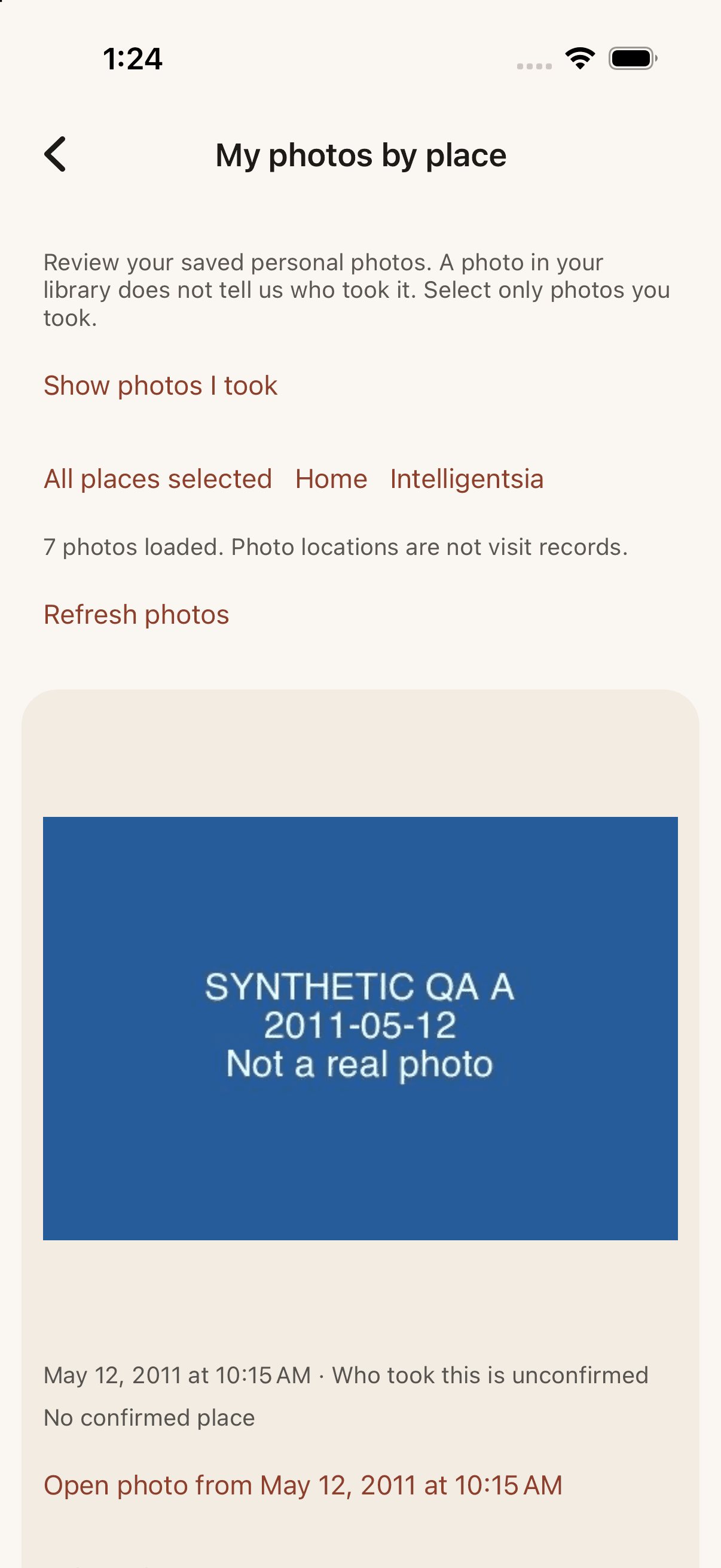
Save new photos and videos privately, then find your own photos by the place tied to each item.

  1. Choose Apple Photos access and separately turn on private Trevio saving.
  2. Trevio saves each eligible item once, even after an interrupted retry.
  3. Open Mine to browse My photos or a place, then view the exact saved version.

Place grouping never claims that a photo proves a visit or who took it.
You Never Knew

Tell one connected friend what one personal photo meant, in your own voice or words.

  1. Open one saved personal photo and choose Tell them what this meant.
  2. Choose one friend, record your voice or write the message, then replay or edit it.
  3. Preview the exact photo, message, and recipient, then explicitly confirm Send; they can Keep in Mine.

Only that approved photo version and message cross the wall. The sender can revoke access.

Before We Met

Two friends make one private chapter from the lives they lived before they knew each other.

  1. Invite one connected friend; after they accept, each person privately chooses three earlier memories.
  2. Each approves exactly what the other may see before either selection is disclosed.
  3. Choose the meeting marker together, then both approve the finished two-timeline chapter.

Trevio highlights only supported links between chosen memories. A story needs no overlap to be complete.

Quiet Yes

Discover a place you would both enjoy without exposing a one-sided interest.

  1. Each person privately chooses the same saved restaurant or café and chooses the other person too.
  2. Trevio reveals the match only after both choices agree.
  3. One person suggests a time; the other accepts, suggests another time, or declines.

A mutual match is interest, not attendance. Every plan still needs an explicit response.

Borrow My Experience

Share a day you loved as three to five reviewed stops that a friend can make their own.

  1. Build and review the stops, order, timing, and selected tips.
  2. Share the view and separately decide whether this friend may keep an editable copy.
  3. They adapt the day, save a private plan, and invite or thank someone only if they choose.

Viewing, copying, inviting, and attending are four separate choices.

Your chapters

See what changed through three to five moments you choose and words you approve.

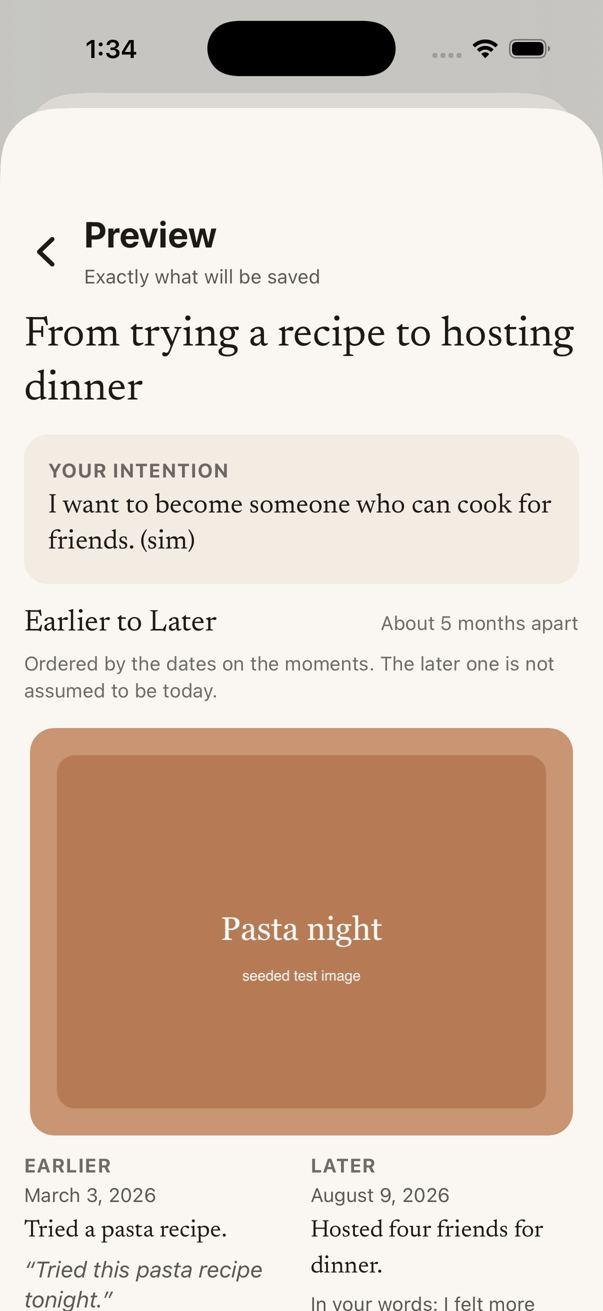
  1. Write your intention and choose your own moments, exact photos, and exact words.
  2. Review the chapter before Save; Trevio does not invent progress or require a positive ending.
  3. Keep it private or share one approved version with one connected friend, then revoke it anytime.

The person decides what the chapter means. Suggestions stay grounded in the material they selected.

Inside the app

Preview the flow before you try it.

These iOS simulator previews use demo content. They show the reviewed interface, while final TestFlight and physical-device checks are tracked separately.

Private organizer showing seven synthetic photos, unknown authorship, and no confirmed place
Photos, saved privatelyThis simulator run saved each imported item once and kept missing place and authorship explicit. Physical-device background importing is still unverified.
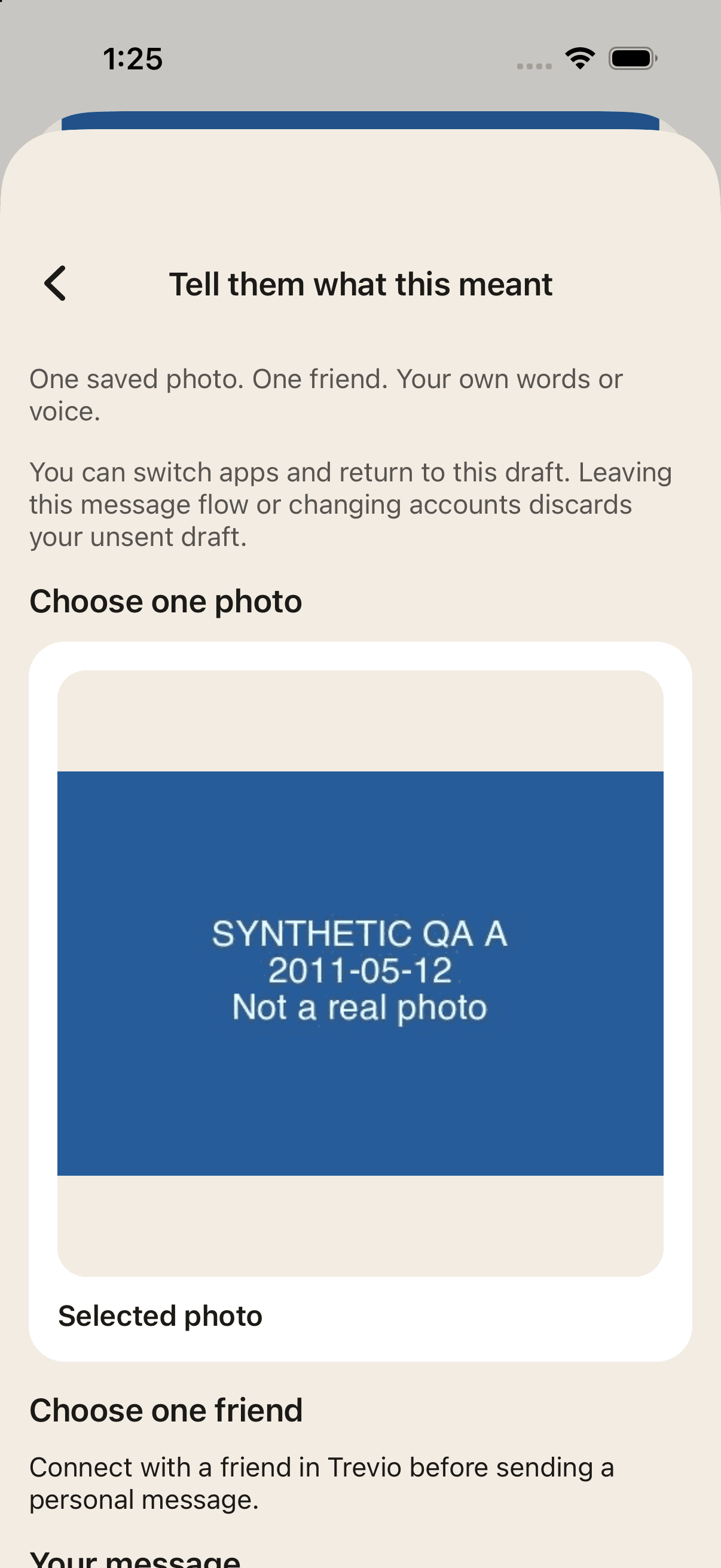
Composer warning that an unsent draft is discarded after an account change, with one synthetic photo selected before friend choice
Start with one exact photoThe composer keeps the selected photo in view. Friend delivery and recipient actions still need the two-account app check.
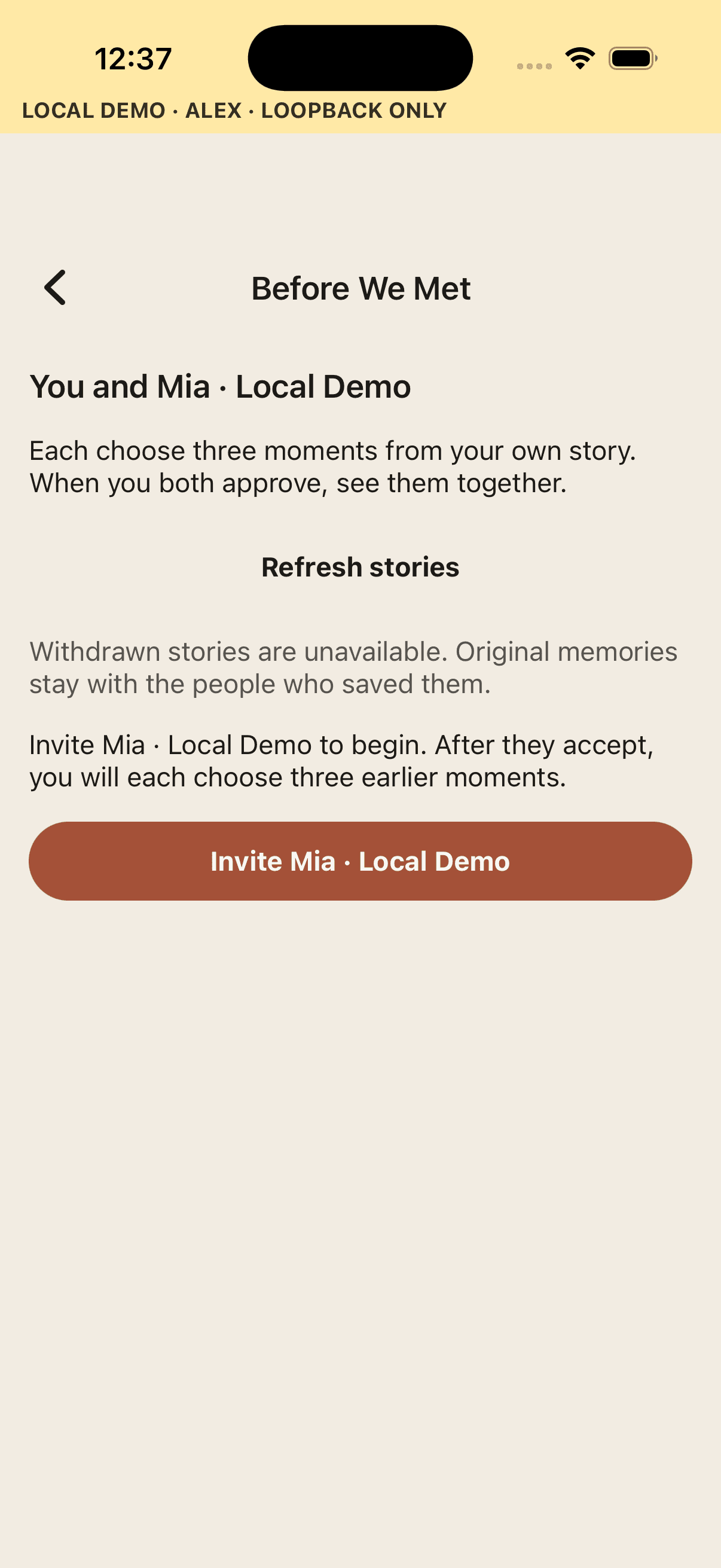
Before We Met screen inviting one connected friend to begin a private story
Before We MetOne friend starts the story. No memories are shared with the invitation.
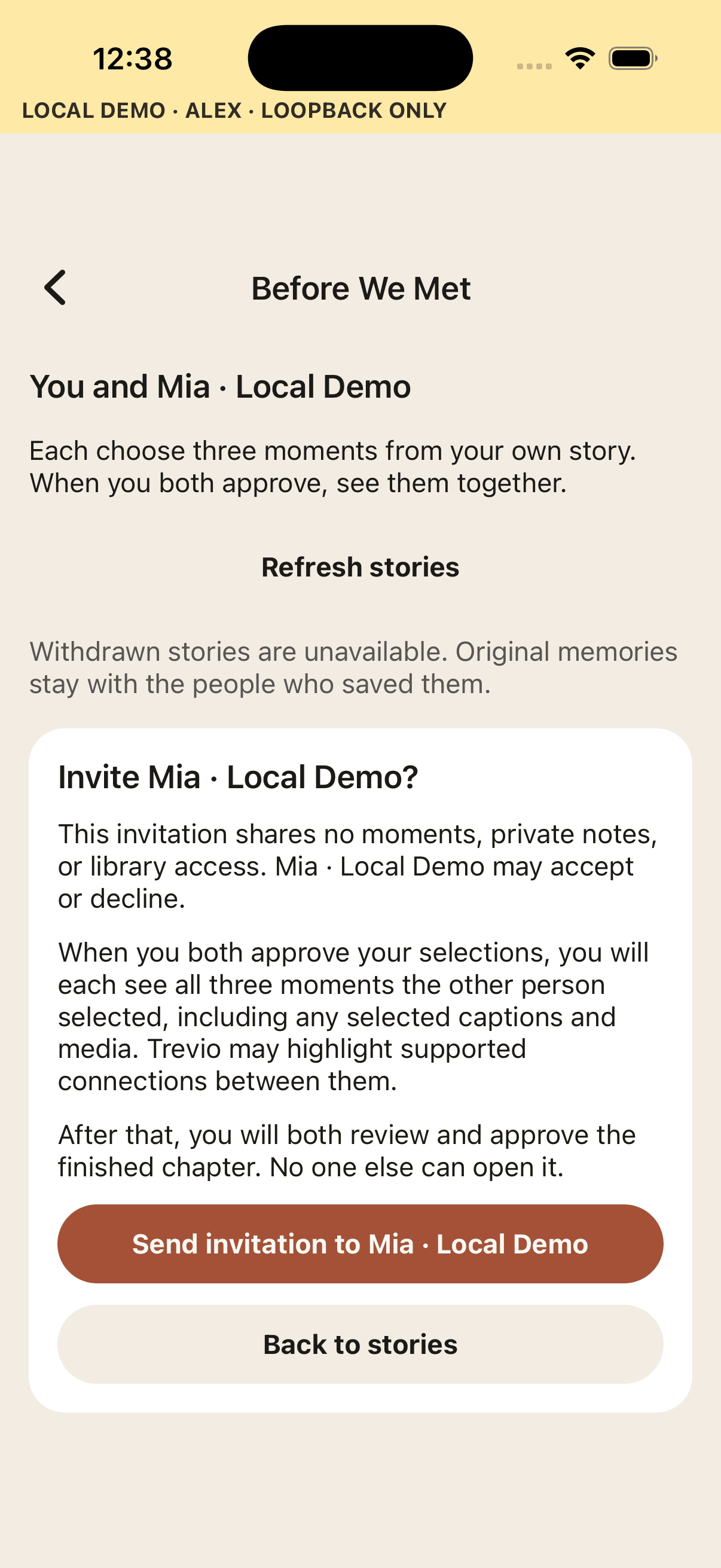
Before We Met invitation review explaining the two approval stages
Review before invitingThe confirmation explains the first disclosure and the finished-chapter approval.
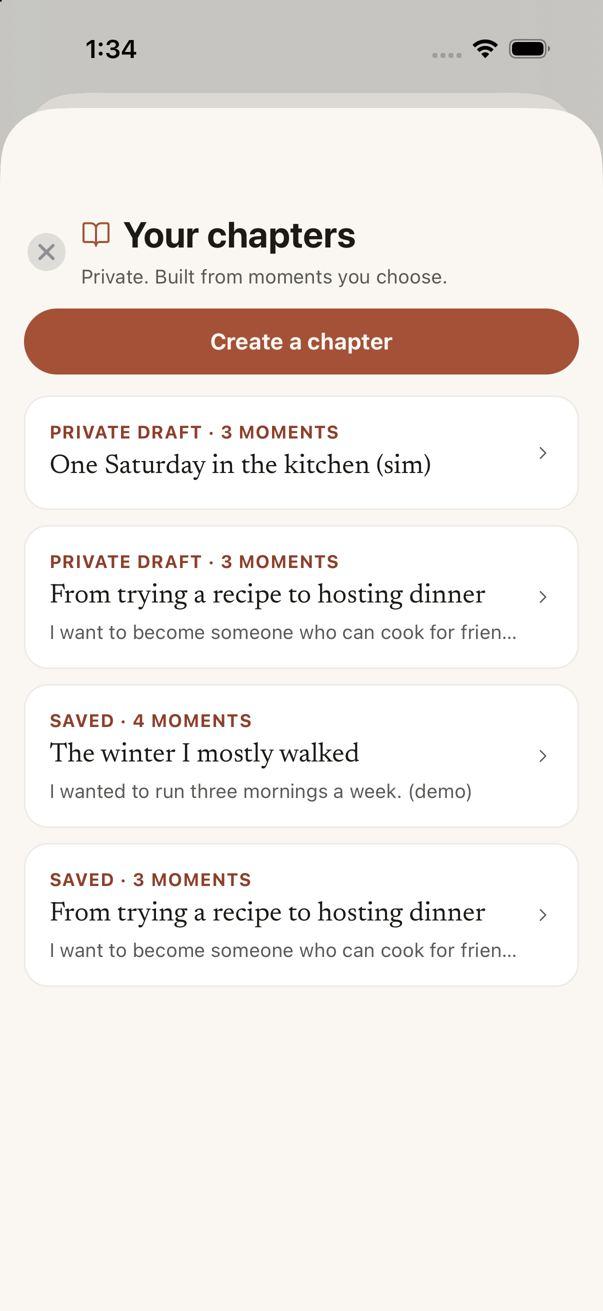
Your chapters screen showing private drafts and saved personal chapters
Your chaptersDrafts and saved chapters stay together in a private list.
Chapter preview showing the exact intention and selected moments before save
Exact preview before SaveThe person reviews the chosen moments and words before the chapter becomes saved.
Clubs

One shared place, for the people you invite — and no one else.

A Club is the only place in Trevio that's shared — your Bible study, your family, the group that actually knows you. Invitations are accepted, never assumed, and what happens in the club stays in the club.

Take a Bible study. While the sermon is being recorded, every passage the preacher names appears on each member's phone within seconds — ready to open and read along. Sessions can repeat every week, and the club keeps its own history, so “what did we study last Wednesday?” always has an answer.

Only the passage reference is shared live — never the audio. The recording stays private to the person who made it unless they choose to share it.

Wednesday Bible Study
Live
1 Corinthians 12:4
Named a moment ago · tap to read along
Psalm 23:17:22
Philippians 4:67:41
Every member sees the passage. No one hears the recording.
Sharing

Share it for an hour, a day, or a year. Then it’s yours again.

When you do share — a document, a memory, a video — you choose how long it lasts: an hour, a day, a month, a year, or no limit. Trevio checks the clock on every open, so when the window closes, access actually ends. No zombie links living forever in someone's inbox.

You get honest receipts — the link was opened, the file was viewed — and you can revoke access at any moment. Files travel as Trevio links, never as attachments you can't take back.

Lease agreement.pdf
Sharing with Sarah
Access window
1 hour1 day1 month1 yearNo limit
Link opened · Tue 9:14 PM
Revoke access
Privacy

A walled garden, by design.

Your life isn't content. It isn't a product, and it isn't for sale. Everything you save stays private to you — and only crosses that line when you personally invite someone into a Club.

It runs all the way down. Even the news you read: Trevio fetches every article and image on its own, so your phone never pings a publisher's trackers with your address or which story you opened.

Our mission

The private AI memory layer for everyday life.

Trevio helps people capture what matters, remember it when needed, act on it with confidence, and share only what they choose. Capture anything, ask Trevio later, and get organized reminders, insights, and next steps — so you can manage less and live more.

Pricing

Free to start. Premium when you want the voice.

Everything essential is free: capture, recall, reminders. Premium adds the spoken side of Trevio and room for a whole life.

Free
$0forever
Up to 50 memories
100 AI scans a month
In-app reminders
100 MB of storage
Premium
$4.99a month, or $39.99 a year
Unlimited memories and full-resolution photos
Ask Trevio by text or voice — with spoken answers
Your daily brief, read aloud
Live real-world answers: places, hours, scores
Clubs — shared with the people you trust
Reminders by push, email, or text
500 AI scans a month and 10 GB of storage
Upgrade inside the app whenever you're ready.

Start remembering what matters.

Save your first thing in seconds. Let Trevio take it from there.

Free to start. Private from the first tap.